
How to find your HDFC Customer ID: HDFC Bank was established in August 1994. It is India’s largest private sector bank and also the sixth largest bank overall. The bank is headquartered in Mumbai and serves millions of customers across the country.
If you have an account with HDFC Bank, your unique Customer ID is like a digital passport within the bank – it allows you to access various services, including NetBanking. If you haven’t used it in a long time and have forgotten it, let’s find out how to retrieve your HDFC Bank Customer ID.
Find your Customer ID through HDFC NetBanking
The easiest way to find your Customer ID is through HDFC Bank’s NetBanking. Follow these simple steps:
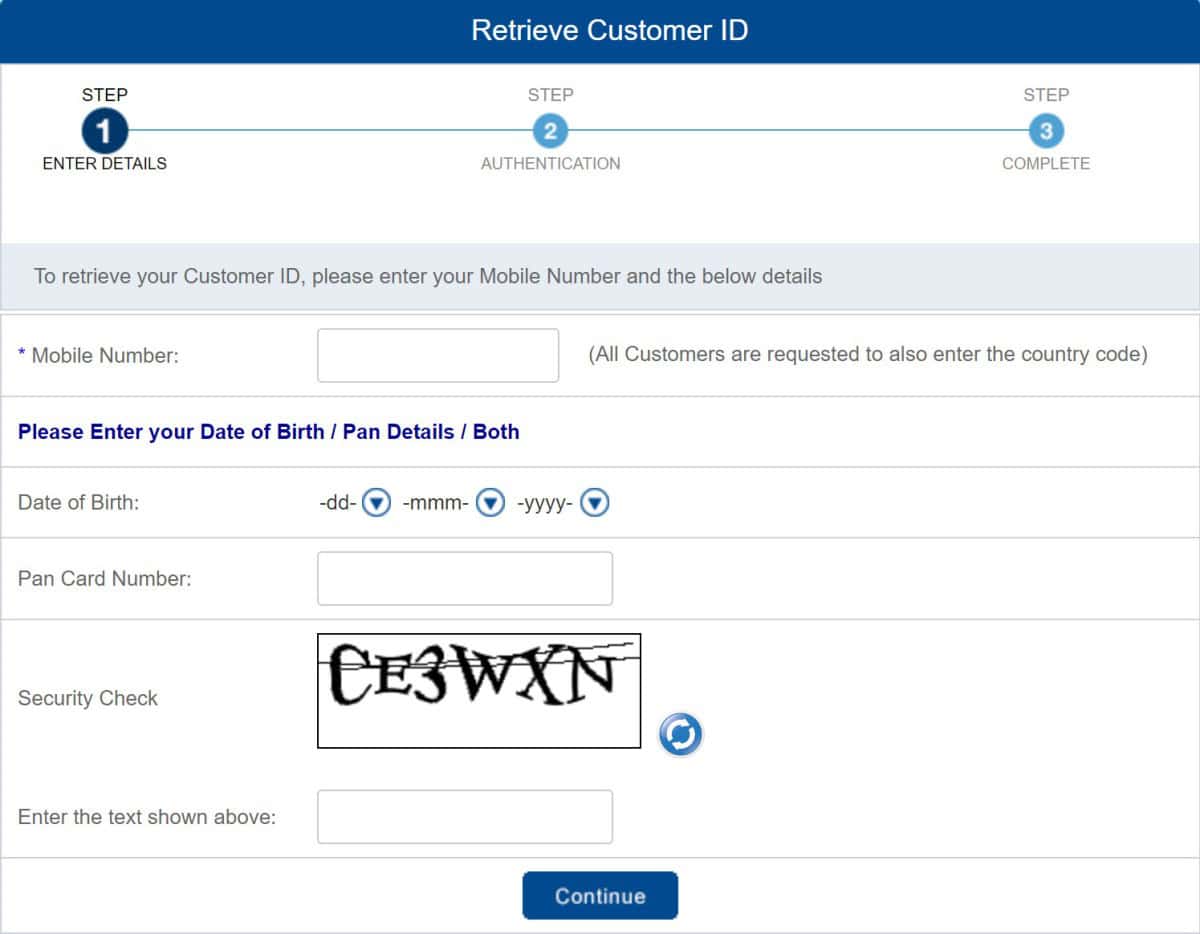
Step 1: Go to the HDFC Bank NetBanking portal and click on the “Forgot Customer ID” link.
Step 2: Enter your registered mobile number (including the country code) and your PAN (Permanent Account Number) or date of birth.
Step 3: Verify the OTP (One-Time Password) sent to your registered mobile number.
Step 4: After successful verification, your unique Customer ID will be displayed.
Note: If you are an NR (Non-Resident) customer, please use your date of birth to retrieve your Customer ID. For authorized signatories of firms, companies, trusts, or other non-individual entities, please use the PAN details of the individual authorized signatory. Members of a HUF (Hindu Undivided Family) should use the HUF’s PAN details.
Account Statement and Passbook
Your HDFC Bank Customer ID is also printed on the first page of your bank passbook. Open your passbook and you will find the Customer ID below your bank account number.
You can also check your Customer ID in your account statement.
Check your HDFC Welcome Kit
When you opened your HDFC Bank account, you would have received a welcome kit. You will find your Customer ID clearly printed in it.
Customer ID can also be found in your Chequebook
Open your HDFC chequebook and look at the first page; you will find your Customer ID and other important account details there as well.
Contact HDFC Customer Care
If you are unable to find your Customer ID using the methods above, don’t worry! You can also find your Customer ID by calling HDFC Bank customer care.
Simply call 1800 1600 / 1800 2600 (Toll-Free) and after providing some identification details, they will provide you with your Customer ID.
What is a bank customer ID and customer number?
A bank customer ID and customer number are one and the same, assigned by the bank to identify its customers.
Is it safe to give out my bank customer ID?
Never share your bank customer ID information over the phone, via SMS, or email.
What did you learn?
Hopefully, you now understand how to find your HDFC Bank Customer ID. Knowing your HDFC Bank Customer ID makes it easier to use online banking services. Keep it safe and enjoy worry-free banking with HDFC.
Whether you’re a new user or an existing account holder, knowing your Customer ID will unlock many convenient features for you.